Jackery Explorer 1000 v2: One or Two SolarSaga 200W Panels?
VibePicks may earn a commission if you buy through links on this page, at no extra cost to you.
One SolarSaga 200W panel is a supported starting point for the US Explorer 1000 v2. Two matching panels let you use its higher combined solar-input limit. The second panel adds collection capacity, not extra battery storage.
This is a configuration guide based on Jackery’s documentation, not a hands-on charging test. It covers the Explorer 1000 v2, not the original Explorer 1000, 1000 Pro or 1000 Plus.
The input limits that decide the configuration
The two DC8020 inputs share a parallel arrangement. For solar input, Jackery specifies 16–60V, a 10.5A current limit and a 200W maximum when using one port. With both ports, the published limit becomes 21A and 400W combined. These are input ceilings; sunlight and the panel’s operating conditions determine what you actually collect.
US Explorer 1000 v2 solar-input reference
When one 200W panel is the sensible choice
A single panel keeps the amount of equipment to carry and position lower. That can matter if you move campsites frequently, have limited clear ground or only need to replace a modest part of your daily energy use. Start with the energy you need to recover, rather than assuming that a larger array is always useful.
For example, suppose your planned recharge target is 600Wh. At an assumed, steady 150W delivered input, simple division gives four hours. That is an illustrative energy calculation, not a promised charging time: it excludes changing sunlight, charging losses, temperature effects and any devices running from the station. If your available solar window is shorter, a second panel may help—but it cannot guarantee the missing energy.
When two matching panels earn their place
Two SolarSaga 200W panels make sense when your recovery target is larger and you have room to position both well. Jackery documents a two-panel configuration for this station. Its support guidance says that one or two panels can use the included cable without buying the additional adapters described for larger arrays. Check the cable included with the exact bundle you order; a station-only package and a solar bundle have different contents.
The benefit is a higher collection ceiling during suitable conditions. It does not double the 1070Wh battery or raise the station’s AC output rating. Two poorly placed panels can still deliver less energy than your plan needs. Before paying for the second panel, compare your recharge window, daily energy target, transport space and the complete package cost.
Jackery’s support page explicitly excludes that mixed-wattage configuration. When both inputs are used, the panel model and quantity connected to each port must match. Solar input and a car-charging cable are also not supported together. Follow the manual for your exact equipment; this guide is not a wiring plan.
Check what the bundle actually contains
The current US product page lists an Explorer 1000 v2 + SolarSaga 200W package with one station, one AC charging cable, one SolarSaga 200 and one multifunctional solar charging cable. “Solar generator” does not by itself mean two panels. Read the selected configuration and included-items list before ordering, especially when switching between colors or station-only and solar options.
For the broader station features, read our Explorer 1000 v2 overview. If you are deciding which panel format to carry, our SolarSaga 100 Air and 200W comparison addresses that separate choice; it does not override the station’s matching-panel rule.
Check the exact US package
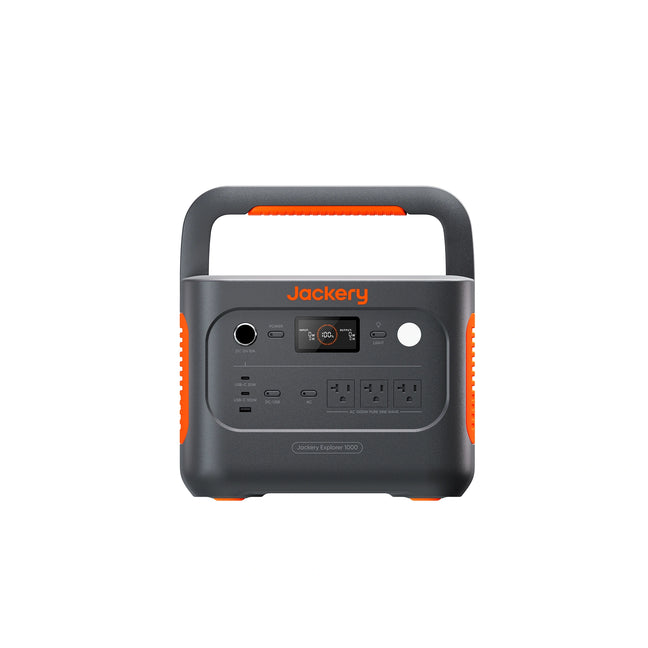
Jackery Explorer 1000 v2 — US model
Availability was checked on October 11, 2026. Prices vary by selected configuration, so this guide leaves out a fixed price. We found no discount code whose application to this exact configuration could be established confidently; check the store’s current conditions before paying.
Sources and scope
The input limits and pairing rules come from Jackery’s Explorer 1000 v2 technical support reference. Package contents were checked against the US store. This guide makes no measured recharge-time claim and does not extend these rules to other Explorer models.
Choose panel count around your recharge window
- Confirm the Explorer 1000 v2 model and US package.
- Check the included cable and actual panel quantity.
- Treat input ratings as limits, not guaranteed solar production.
Choose one 200W panel for a simpler supported setup when it fits your energy target. Consider two matching panels when you need the higher combined input ceiling and have the space and solar window to benefit.